
No products in the cart.

Which Motherboard Should I Pick for a New Gaming Build? (Complete Guide for All CPUs) Leave a comment
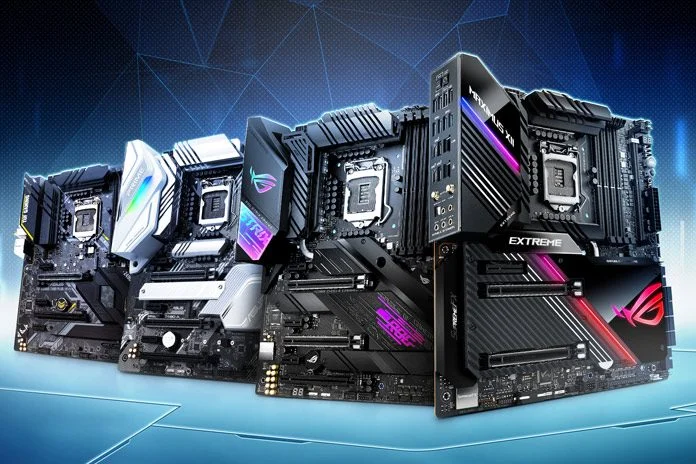
Choosing the right motherboard is easier once you stop looking at models and start matching CPU → chipset → features. Below is the definitive breakdown — every major gaming CPU, and exactly which motherboard tier fits it best, along with practical comparisons between AMD and Intel options.
1. First Rule: Pick Your CPU → Then Your Motherboard
Different CPUs require specific sockets and chipset families:
- AMD Ryzen 7000 / 8000 Series → AM5 Socket
Chipsets: A620, B650, B650E, X670, X670E, X870, X870E - Intel 12th / 13th / 14th Gen (“Alder Lake”, “Raptor Lake”) → LGA 1700 Socket
Chipsets: H610, B660, B760, H670, Z690, Z790 - Intel 15th Gen (Arrow Lake) → LGA 1851 Socket
Chipsets: Z890 (and upcoming B-series, H-series)
Once you know your CPU, the rest is about VRMs, PCIe lanes, thermal design, and features you actually need.
2. Motherboard Tier Breakdown (Applies to Both AMD & Intel)
| Tier | Purpose | Who Should Buy |
|---|---|---|
| Entry (A620 / H610 / B660 low-end) | Basic builds, limited PCIe & VRM | Budget gamers, office builds |
| Mid-Range (B650 / B760 / B650E / Z690 mid / Z790 mid) | Best value, strong VRMs, multiple M.2 | 90% of gamers |
| High-End (X670 / X670E / X870E / Z790 high / Z890) | Overclocking, PCIe Gen5 lanes, content creation | Enthusiasts |
| Flagship (ROG Crosshair / Aorus Master / MEG ACE etc.) | Extreme OC, maximum features | Power users only |
3. The Best Motherboard Choices for Every Popular Gaming CPU
Below is the definitive list.
For each CPU family, you’ll get:
- Recommended chipset/tier
- Why it fits
- When to upgrade or downgrade
- Equivalent options across AMD & Intel
A) AMD Ryzen 7000 / 8000 Series (AM5)
(Ryzen 5 7600 → Ryzen 7 7800X3D → Ryzen 9 7950X3D → Ryzen 9 9950X and beyond)
1. Ryzen 5 7600 / 7600X / 8600G (Budget → Mid-range gaming)
Recommended:
- B650 (Perfect balance)
- A620 (Only if extremely tight budget)
Why B650?
- Strong enough VRMs for all Ryzen 5 CPUs
- PCIe 4.0 everywhere is fine for modern GPUs
- 2–3 M.2 slots (enough for most gamers)
Upgrade to B650E if:
You want PCIe 5.0 SSD or GPU support for future generations.
Avoid:
X670/X670E — overkill for Ryzen 5 unless you need heavy I/O.
2. Ryzen 7 7700X / 7800X3D (High-end gaming)
Recommended:
- B650 (Good)
- B650E (Better)
- X670 (Best for mixed workloads)
Why?
7800X3D benefits from stable VRMs and cool board design, not extreme overclocking.
B650 boards with robust VRMs handle it flawlessly.
Upgrade to X670/X670E if:
- You want more M.2 slots
- You run high-speed DDR5
- You want full Gen5 support
3. Ryzen 9 7900X / 7950X / 7950X3D / 9950X (Enthusiast + Creator)
Recommended:
- X670E (Ideal)
- X670 (Good)
- B650E (Only if VRM quality is high)
Why X670E?
These CPUs pull high sustained power; X670E motherboards come with:
- Strong VRMs (16–20+ phase designs)
- Better chipset cooling
- Multiple PCIe 5.0 lanes
- Multi-NVMe setups (content creators benefit)
Avoid:
A620 or basic B650 — VRMs will struggle under heavy loads.
B) Intel 12th / 13th / 14th Gen (LGA 1700)
(i5-12400 → i7-12700K → i5-13600K → i9-14900K)
1. Intel i5-12400 / i5-13400 / i5-14400 (Budget → mid gaming)
Recommended:
- B660 (Great)
- B760 (Best choice today)
- H610 (Only for tight budgets)
Why B760?
- Best I/O
- Supports strong memory OC
- Good VRMs for 6-10 core CPUs
- Affordable
Avoid:
Z790/Z690 — unnecessary unless pairing with a K-series CPU.
2. Intel i5-12600K / 13600K / 14600K (Top-tier mid gaming CPU)
Recommended:
- Z690 (Best value if updated BIOS)
- Z790 (Modern choice)
- B760 (Budget-friendly, no manual OC)
Why Z790?
K-series CPUs scale well with better VRMs, so Z-series lets them boost consistently.
Go Z690 if:
You find a model with a BIOS that supports your CPU.
3. Intel i7-12700K / 13700K / 14700K (High-end gaming + productivity)
Recommended:
- Z790 (Ideal)
- Z690 high-end (Good)
Why?
These CPUs produce substantial sustained heat.
Good Z-series boards offer:
- Strong VRMs
- Better power delivery
- Multiple M.2 slots
- More PCIe bandwidth
Avoid B760 unless it’s a very high-end model with strong VRMs.
4. Intel i9-12900K / 13900K / 14900K (Enthusiast class)
Recommended:
- High-end Z790 (Best)
- Top Z690 (Acceptable if VRMs are strong)
Why?
These chips draw extreme power during boosts; only premium boards maintain stability.
Avoid all H/B-series motherboards.
C) Intel 15th Gen (Arrow Lake, LGA 1851)
Current option:
- Z890 (Flagship)
Recommended:
- Z890 for all i5, i7, i9 Arrow Lake CPUs
Why?
Arrow Lake currently offers only Z-series boards; they include:
- DDR5-only support
- Better PCIe layout
- High-speed I/O
- Future CPU support
4. AMD vs Intel: Which Motherboard Platform Is Better
| Area | AMD AM5 | Intel LGA1700/1851 |
|---|---|---|
| Longevity | Strong (AM5 until 2026+) | LGA1700 ended; LGA1851 very new |
| PCIe 5.0 adoption | Wider on B650E/X670E | Mostly on high-end Z-series |
| VRM quality per dollar | Often better | Good but pricey on Z790 |
| Upgrade path | Excellent | LGA1700 done; LGA1851 long future |
| Budget builds | Ryzen 5 + B650 unbeatable | i5-12400/i5-13400 still kings |
5. Exact Recommendation Matrix (CPU → Motherboard)
Best Matches (Guaranteed Compatible & Well-Balanced)
AMD
- Ryzen 5 7600 → B650
- Ryzen 7 7800X3D → B650E / X670
- Ryzen 9 7950X / 9950X → X670E
Intel LGA1700
- i5-13400F → B760
- i5-14600K → Z790
- i7-14700K → Z790 high-end
- i9-14900K → Z790 flagship
Intel LGA1851
- i5 / i7 / i9 Arrow Lake → Z890
6. VRM Comparison: Which Tiers Handle Which CPUs?
| CPU Class | Safe VRM Tier | Explanation |
|---|---|---|
| Ryzen 5 / i5 Non-K | B650 / B760 | Light power draw |
| Ryzen 7 / i5-K | B650E / Z790 | Needs sustained power delivery |
| Ryzen 9 / i7-K | X670 / Z790 high-end | Multi-core workloads |
| i9-K / Ryzen 9 X3D | X670E / Z790 flagship | Highest current draw |
7. PCIe & M.2 Comparison Between Boards
| Tier | PCIe GPU | PCIe M.2 | Notes |
|---|---|---|---|
| A620 / H610 | Gen4 | 1× Gen4 | Entry level |
| B650 / B760 | Gen4 | 2–3× Gen4 | Best value |
| B650E / X670E | Gen5 | Gen5 + Gen4 | Future-proof |
| Z790 | Gen4 (some Gen5) | 3–5 slots | Balanced |
| Z890 | Gen5 | Gen5 heavy | Top end |
8. Final Answer: Which Motherboard Should You Pick?
If you want a simple conclusion:
Best Overall Value (2025)
AMD Ryzen 7 7800X3D + B650E motherboard
Best Budget Combo
Ryzen 5 7600 + B650 or Intel i5-13400F + B760
Best High-End Gaming
Intel i7-14700K + Z790 mid/high
Ryzen 7 7800X3D + X670
Best Creator + Gaming Hybrid
Ryzen 9 7950X / 9950X + X670E
Maximum Future-Proofing
Intel Arrow Lake + Z890
AMD AM5 X670E / X870E