
No products in the cart.

-10%


Access Points

TP-Link EAP225-Outdoor AC1200 Access Point
Upgrade your outdoor WiFi infrastructure with the TP-Link EAP225-Outdoor AC1200—a high-performance access point crafted for demanding environments.
- Dual-band speeds: up to 300 Mbps on 2.4 GHz + 867 Mbps on 5 GHz
- Weather-proof build: IP65-rated for outdoor deployment
- Full Gigabit port + PoE: Power over Ethernet (802.3af/at and passive PoE included)
- Seamless roaming & Mesh ready: Ideal for business and public campus WiFi networks
₨ 22,499 ₨ 25,000

TP-Link EAP225-Outdoor AC1200 Access Point — Built for reliable outdoor WiFi
When you need a robust wireless solution that can withstand Pakistan’s challenging outdoor conditions while delivering high-speed connectivity, the TP-Link EAP225-Outdoor AC1200 stands out as a top choice. Designed for both indoor and outdoor use, this access point brings enterprise-grade features into a flexible package suitable for campuses, hospitality venues, outdoor lanes and large properties.
Superior Performance & Coverage
This access point supports the 802.11ac Wave 2 standard with MU-MIMO technology, delivering combined dual-band throughput of up to ~1,167 Mbps (300 Mbps on 2.4 GHz + 867 Mbps on 5 GHz) as stated by the local distributor. It features high-gain antennas and dedicated amplifier design to extend range and stability in outdoor environments. :contentReference[oaicite:1]{index=1}
Weather-Proof & Deployment-Friendly
With an IP65-rated enclosure, the EAP225-Outdoor is built to operate in open areas, resisting dust, rain, and temperature extremes. It supports both standard 802.3af/at PoE and passive PoE (adapter included) for flexible installation across wall or pole mounts. :contentReference[oaicite:2]{index=2}
Smart Management & Business Features
Fully integrated into the Omada SDN ecosystem from TP-Link, this access point offers centralized cloud-based management, seamless roaming (802.11k/v) and mesh-enabled wireless backhaul for extended coverage. These features make it ideal for IT managers or businesses looking to deploy a managed WiFi network with guest authentication, captive portal and analytics. :contentReference[oaicite:3]{index=3}
Why It’s a Great Choice for Pakistan
Given local infrastructure challenges—such as wiring constraints, outdoor exposure and high user density—the EAP225-Outdoor offers a dependable solution. The PoE capability means fewer power outlets are needed, and the high-gain outdoor antennas ensure clients receive a strong signal even across large open areas. Whether covering a resort, school campus or outdoor café, it brings enterprise-class WiFi at accessible cost.
Installation & Use-Case Tips
Install on a pole or wall using the supplied mount kit. For best performance, ensure clear line-of-sight if possible and power it via PoE from your network switch or dedicated injector. Use the Omada app or controller to group multiple EAP225-Outdoor units into a mesh network and activate roaming for uninterrupted client experience.
TP-Link EAP225-Outdoor AC1200 Access Point Price in Pakistan
| Specification | Details |
|---|---|
| Wireless Standard | IEEE 802.11a/b/g/n/ac (Wave 2) |
| Maximum Throughput | 2.4 GHz: up to 300 Mbps 5 GHz: up to 867 Mbps Total: ~1,167 Mbps (AC1200 class) |
| Antennas | 2 × 2.4 GHz Omni 3 dBi 2 × 5 GHz Omni 4 dBi (detachable) :contentReference[oaicite:4]{index=4} |
| Ethernet Interface | 1 × Gigabit RJ-45 (supports 802.3af/at and passive PoE) :contentReference[oaicite:5]{index=5} |
| Power Supply | 802.3af/at PoE (Alternative A) or 24 V Passive PoE (adapter included) :contentReference[oaicite:6]{index=6} |
| Power Consumption | Max 10.5 W :contentReference[oaicite:7]{index=7} |
| Operating Temperature | -30 °C to +70 °C (outdoor-ready) :contentReference[oaicite:8]{index=8} |
| Enclosure Rating | IP65 weather-proof :contentReference[oaicite:9]{index=9} |
| Management Features | Omada SDN cloud/centralised management, Seamless roaming (802.11k/v), Mesh support :contentReference[oaicite:10]{index=10} |
| Dimensions | 215.7 × 45 × 37.7 mm (without antenna & mount) 403.8 × 90.7 × 55.2 mm (with antenna & mount) :contentReference[oaicite:11]{index=11} |
| Warranty | Manufacturer warranty (refer channel) :contentReference[oaicite:12]{index=12} |
Brand
TP-Link
Based on 0 reviews
Be the first to review “TP-Link EAP225-Outdoor AC1200 Access Point”
Related products
- Access Points
TP-Link EAP650 AX3000 Ceiling Mount WiFi 6 Access Point
Experience blazing-fast WiFi 6 performance with the TP-Link EAP650 AX3000 Ceiling Mount Access Point — designed for businesses that demand reliability, speed, and full coverage.
- WiFi 6 Speed: Up to 2976 Mbps combined
- Seamless Roaming: Uninterrupted connectivity across APs
- Omada SDN: Centralized cloud management
- PoE+ & DC Power: Flexible installation options
- Ultra-Slim Design: Elegant, space-saving profile
Ideal for offices, hotels, schools, and enterprises.
SKU: n/a - USB Adapter
TP-Link Archer T4U AC1300 High Gain Wireless Dual Band USB Adapter
TP-Link Archer T4U AC1300 delivers blazing-fast dual-band Wi-Fi performance with improved range and superior coverage. Perfect for HD streaming, gaming, and high-speed browsing.
- Ultra-Fast Speeds: Up to 1300Mbps (867Mbps on 5GHz & 400Mbps on 2.4GHz)
- High-Gain Antennas: For extended coverage and stability
- USB 3.0: Up to 10x faster than USB 2.0
- OS Support: Compatible with Windows 11/10/8.1/8/7
Reliable, fast, and secure — built for seamless online performance.
SKU: n/a - Gigabit Switches
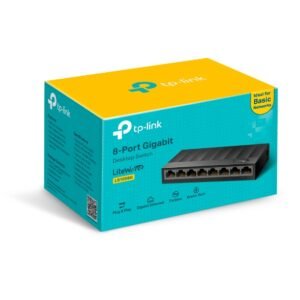
TP-Link LS1008G 8-Port Gigabit Desktop Switch
TP-Link LS1008G is a high-speed 8-Port Gigabit Desktop Switch designed for small offices, homes, and SOHO networks.
- 8× Gigabit RJ45 ports with Auto-Negotiation & Auto-MDI/MDIX
- Plug & Play setup — no configuration required
- Green Ethernet technology for power saving
- Fanless design ensures silent operation
Ideal for expanding your wired network efficiently and quietly.
SKU: n/a - Wi-Fi Routers
TP-Link Archer C20 AC750 Wireless Dual Band Router
TP-Link Archer C20 AC750 Dual Band Router delivers reliable Wi-Fi for your home or office. Enjoy smooth HD streaming and fast gaming.
- Speed: 300 Mbps (2.4GHz) + 433 Mbps (5GHz)
- Antennas: 3 External for stable signal
- Modes: Router / Range Extender / Access Point
- Features: IPTV, Guest Network, Parental Controls
Reliable Wi-Fi — Everywhere!
SKU: n/a



There are no reviews yet.